The Circuit Browser tab
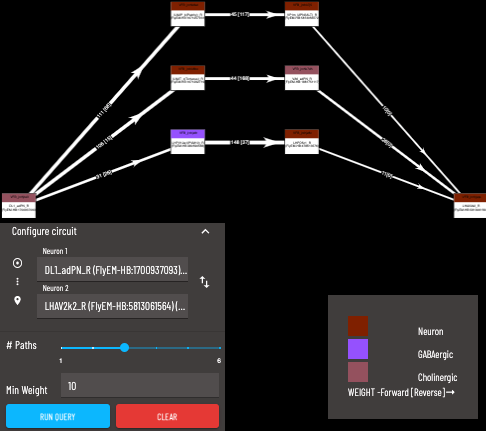
The Circuit Browser allows you to find the strongest paths from one neuron (the source neuron) to another (the target neuron).
The ‘strongest’ paths are the shortest/highest weighted paths. Paths are arranged from the ‘strongest’ at the bottom to the ‘weakest’ at the top. A detailed explanation for the algorithm used to determine path strengths can be found here.
Search for the source neuron to start from (Note: query is directional)
Search for the target neuron
Maximum number of paths to return (only the ‘strongest’ paths will be returned)
A minimum weight for the synapse count of each connection can be applied, paths containing individual connections below this minimum will not be returned
Add a neuron from Term Info
Individual neurons with connectivity data show an Add [term] to Circuit Browser Query link in their Term Info pane. Clicking it opens the Circuit Browser with that neuron filled into the first empty neuron field (if both fields are already set, it replaces the last one), so you can build a path search from the neuron you are looking at without searching for it again.